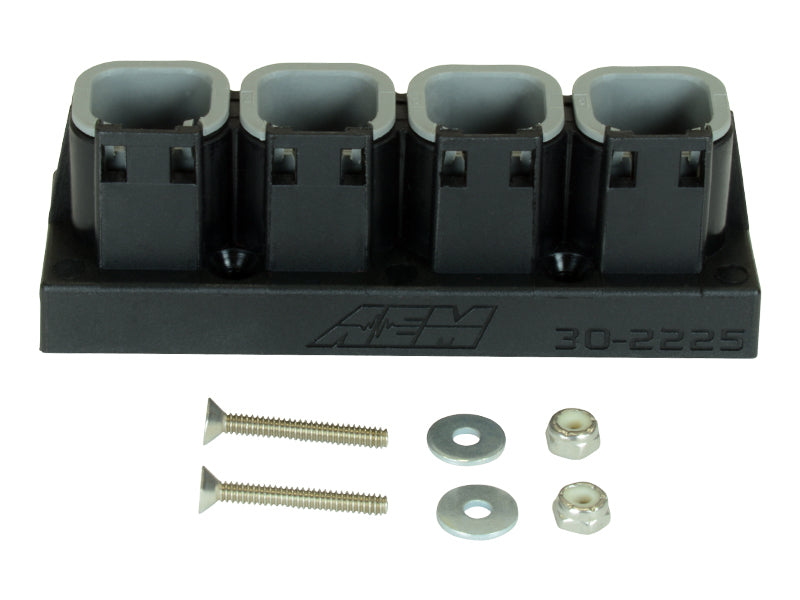


AEM 4-Port AEMnet CAN Hub AEM30-2225
AEM 4-Port AEMnet CAN Hub AEM30-2225
AEM -
Couldn't load pickup availability
- Mounting hardware included (two 4-40 x 7/8" flat head screws, two 4-40 x 0.375" washers and two 4-4 x 9/64" Nylock nuts)
- Easily connect and power multiple AEMnet CAN devices from a central docking station!
- Four integrated 4-way DTM-style housings provide reliable AEMnet CAN connections
- Compact enclosure - 3.45" (87.63mm) Long x 1.18" (29.85mm) Tall
- Safe for engine bay mounting - IP67-rated enclosure
- Daisy chain two Hubs to connect six AEMnet Devices
The AEM 4-Port AEMnet CAN Hub provides a centralized connection point for multiple AEMnet CAN bus-enabled devices. Part number AEM30-2225 features four integrated 4-way DTM-style connections, helping organize wiring while simplifying installation and service. The hub can distribute power to connected devices through a single input with a maximum current capacity of 3 amps. It is not intended to power UEGO sensor heaters.
Designed for motorsport, performance, and automotive data systems, this compact AEMnet CAN Hub supports a clean and reliable network layout without requiring multiple Y-cables. Two hubs can be daisy-chained to connect up to six AEMnet devices, making the system easier to expand as additional compatible equipment is added. Its IP67-rated enclosure is suitable for protected engine bay mounting and helps guard the electronics against dust and water exposure.
Mounting hardware is included for a straightforward installation. The package contains two 4-40 x 7/8-inch flat-head screws, two 4-40 x 0.375-inch washers, and two 4-40 x 9/64-inch Nylock nuts. The AEM30-2225 is intended for use with compatible AEMnet CAN devices and is not emissions-certified for California Air Resources Board applications.
Key Product Specifications and Technical Data
- Brand: AEM
- Part Number: AEM30-2225
- Product Type: 4-port AEMnet CAN hub
- Network Compatibility: AEMnet CAN bus-enabled devices
- Connection Style: Four integrated 4-way DTM-style housings
- Maximum Power Capacity: 3 amps through a single hub power connection
- Expansion Capability: Two hubs can be daisy-chained to support up to six AEMnet devices
- Environmental Protection: IP67-rated enclosure for suitable engine bay mounting
What's Included
- One AEM 4-Port AEMnet CAN Hub
- Two 4-40 x 7/8-inch flat-head screws
- Two 4-40 x 0.375-inch washers
- Two 4-40 x 9/64-inch Nylock nuts
Features:
- Centralized AEMnet CAN Connection: Connect multiple compatible AEMnet devices from one organized docking station.
- Power Distribution: Supplies power to connected devices through one port with a maximum capacity of 3 amps; not for UEGO sensor heaters.
- Four Integrated CAN Ports: Uses four reliable 4-way DTM-style housings for clean, secure AEMnet connections.
- Expandable Network Design: Daisy-chain two hubs to connect up to six AEMnet devices while reducing wiring clutter.
| Air Freight Prohibited: false |
| Not Carb Approved: true |
| Carb Acknowledgement Required: false |
| Ltl Freight Required: false |
| Prop 65: Unknown |
| Part Type: automotive |
| Epa: N/A |
| Regular Stock: t |
| Units Per Sku: 1 |
Fitments
Fitments
Materials
Materials
Shipping & Returns
Shipping & Returns
Dimensions
Dimensions
Care Instructions
Care Instructions
Share